Compatible with Chrome and Edge
Instruction Guide
We have a simple tutorial guide which explains the features of the software extension and what each button inside the extension does. Read our tutorial and welcome guide on how to use the extension to the fullest. Use all the features of this browser software.
If you are interested in other web extensions to install, you might wish to check out the Microsoft Bing Search with Rewards extension.
Microsoft Bing Search with Rewards Extension
It allows you to complete daily offers to get points.
Track the number of points you have currently and the rewards you can redeem with these points.
The ways to get points & get rewarded is search with Bing, browse with Microsoft Edge and shop at the Microsoft and Windows stores to earn rewards.
Sponsored Link:
Other useful extensions
Another extension which would be useful to install is the iCloud bookmarks extension.
It allows to keep your Chrome bookmarks on Windows synced up with the Safari bookmarks on your iPhone, iPad, and Mac.
iCloud will store your website bookmarks so it is accessible even on your iPhone and Mac.
Try these other two extensions and see if it will boost your daily productivity.
Automatically set YouTube videos to play in HD, 4K, 8K mode.
Features:
Install and open.
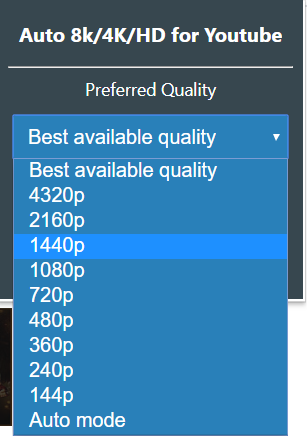
- After installing the extension. You click on the icon to set the default quality setting you want inside your Youtube videos.
YouTube offers a variety of video quality options. Here is what they are and how to use them:
480p: 480p is the minimum resolution YouTube recommends for viewing videos on your computer or laptop. If you want to watch the highest-quality videos, then you'll want to select this option.
720p: 720p video is higher quality than 480p and offers a better picture. This is the default setting for most users, but if you have a fast internet connection and a good computer, you can choose this option instead of 480p.
1080p: 1080p (also known as Full HD) produces even better-looking videos than 720p — it's the highest level of video quality currently available on YouTube. However, it requires a lot more bandwidth than 720p and may not be playable on older computers with slower processors or limited hard drive space.
Here is a more indepth explanation of the different formats.
There are three options:
High Definition (HD) - Videos that are uploaded in HD will play at 1080p or 720p, depending on your device and internet connection. This is the best quality available, but it takes up more space on your device and requires more bandwidth from your internet service provider.
Standard Definition - Standard definition videos play at 480p by 360 pixels, which is slightly larger than a standard DVD resolution. SD is good for older computers and devices with slower processors and weaker network connections. It also allows you to save storage space on your device when you're streaming from YouTube.
Low-Quality - Low-quality videos play at 144p by 144 pixels, which is about the same size as a standard VHS tape (well, sort of). This option uses less bandwidth and storage space on your device than HD or SD, but it will look blurry and pixelated if you're watching on a large screen or high-resolution display.
Tutorial:
- Install the Extension
-
After installing the extension, click on the icon
 on the toolbar.
Sponsored Link: